Important Question from Microprocessor

1. Define the mnemonics group of instruction set of 8085 microprocessor?
2. What is bus? Explain the bus architecture of 8085 with bock diagram .
3. Define the register in 8085 with functional description.

  1. What are the different types of instruction set in 8085 microprocessor? Expalin in brief.
  2. Explain the software and hardware interrupt in 8085 microprocessor.
  3. How to write in assembly language that add the content of register to the content of register A?
  1. Calculate the number of register in a 64K memory board.

8 Write an assembly program to i) subtract the 2 numbers ii) Multiply the 2 numbers iii) to multiply a number by 10   iv) to find the least number between the 2 numbers.

  1. Explain the various formats for specifying the operands(Addressing Modes).
  2. Explain the 8085 microprocessor as programming model.
  3. Explain the microprocessor initiated operation with a diagram.
  4. Explain the organization of a microprocessor based system with a diagram.

Explain the organization of a microprocessor based system with a diagram?

.ANS:

CCCC

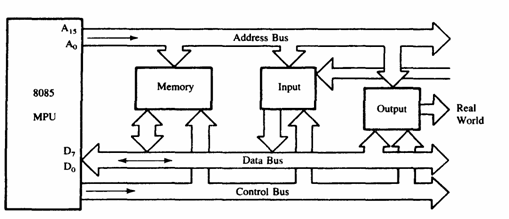
Above figure shows a simplified but formal structure of a microprocessor-based sys­tem or a product. Since a microcomputer is one among many microprocessor ­based systems, it will have the same structure as shown in Figure 3. It includes four components: microprocessor. input, output; and memory (Read/Write Mem­ory and Read-Only Memory). These components are organized around .a common communication path called a bus. The entire group of components is also referred to as a system or a microcomputer system, and the components themselves are referred to as sub-systems. At the outset, it is necessary to differentiate between the terms microprocessor and microcomputer because of the common misuse of these terms in popular literature. The microprocessor is one component of the microcomputer. On the other hand, the microcomputer is a complete computer similar to any other computer, except that the CPU functions of the microcom­puter are performed by the microprocessor. Similarly, the term peripheral ,is used for input/output devices. The various components of a microprocessor-based product or a microcomputer are shown in Figure and their functions are de­scribed in this section.

INPUT

The input section transfers data and instructions in binary from the outside world to the microprocessor. It includes such devices as a keyboard, a teletype, and an analog-to-digital converter. Typically, a microcomputer used in college laborato­ries includes either a hexadecimal keyboard or an ASCII keyboard as an input device. The hexadecimal (Hex) keyboard has 16 data keys (0 to 9 and A to F) and some additional function keys to perform such operations as storing data and. executing programs. The ASCII keyboard (explained in Section I .3) is similar to a typewriter keyboard, and it is used to enter programs in an English-like lan­guage. Although the ASCII keyboard is found in most microcomputers, single­ board microcomputers generally have Hex keyboards, and microprocessor-based products such as a microwave oven have decimal keyboards.

OUTPUT

The output section transfers data from the microprocessor to such output devices as light emitting diodes (LEDs), a cathode-ray tube (CRT), a printer, a magnetic tape, or another computer. Typically, single-board computers and rnicroprocessor­ based products (such as a dishwasher) include LEOs, seven-segment LEOs, and alphanumeric LED displays as output devices.

MEMORY

Memory stores such binary information as instructions and data, and provides that information to the microprocessor whenever necessary. To execute pro­grams, the microprocessor reads instructions and data from memory and per­forms the computing operations in its ALU section. Results are either transferred to the output section for display or stored in memory for later use. The memory block shown in Figure 3 has two sections: Read-Only Memory (ROM) and Read! Write Memory (R/WM), popularly known as Random-Access Memory (RAM).

The ROM is used to store programs that do not need alterations. The mon­itor program of a single-board microcomputer is generally stored in the ROM. This program interprets the information entered through a keyboard and provides equivalent binary digits to the microprocessor. Programs stored in the ROM can only be read; they cannot be altered .

The Read/Write Memory (R/WM) is also known as user memory . It is used to store user programs and data. In single-board microcomputers, the monitor program monitors the Hex keys and stores those instructions and data in the R1W memory. The information stored in this memory can be easily read and altered.

SYSTEM BUS

The system bus is a communication path between the microprocessor and periph­erals; it is nothing but a group of wires to carry bits. In fact, there are several buses in the system that will be discussed 10 the next chapter. All peripherals (and memory) share the same bus; however, the microprocessor communicates with only one peripheral at a time. the timing is .provided by the control unit of the microprocessor

Explain the microprocessor initiated operation with a diagram?

ANS:Microprocessor performs the following initiated operations

Memory read       :               Read data from memory

Memory write      :               Writes data into memory

I/O Read              :               Accepts data from input devices

I/O write              :               Sends data to output devices

To communicate with a peripheral the MPU needs to perform the following steps

Step1    :               Identify the peripheral on the memory location

Step2    :               Transfer data

Step3    :               Provide timing and synchronizing signals

Microprocessor performed these functions using sets of

buses [Data bus, Address bus, Control bus].

 BB

To communication with a memory, for example to read

instruction from memory location:-

1- Mp placed 16-bit address on address bus.

2- The address on the bus is decoded by an external logic circuit.

3- The memory location is identified.

4- The Mp sends a pulse called memory read as control signal.

5- The pulse activates the memory chip.

6- The contents of the memory location (8-bit data) are placed on the

data bus as in fig.

http://www.uotechnology.edu.iq/dep-laserandoptoelec-eng/branch/lectures/microprocessor/16.pdf

Explain the 8085 microprocessor as programming model?

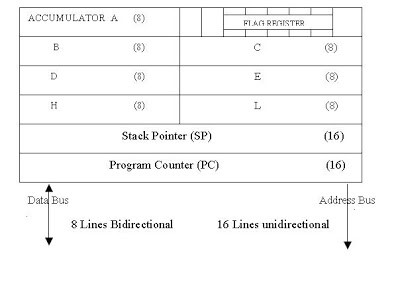
ANS: The 8085 programming model includes six registers, one accumulator, and one flag

register, as shown in Figure. In addition, it has two 16-bit registers: the stack pointer and the program counter. They are described briefly as follows.

RE

Registers
The 8085 has six general-purpose registers to store 8-bit data; these are identified as B,C,D,E,H, and L as shown in the figure. They can be combined as register pairs – BC, DE, and HL – to perform some 16-bit operations. The programmer can use these registers to store or copy data into the registers by using data copy instructions.
Accumulator
The accumulator is an 8-bit register that is a part of arithmetic/logic unit (ALU). This register is used to store 8-bit data and to perform arithmetic and logical operations. The result of an operation is stored in the accumulator. The accumulator is also identified as register A.
ACCUMULATOR A (8) FLAG REGISTER
B (8)
D (8)
H (8)
Stack Pointer (SP) (16)
Program Counter (PC) (16)
C (8)
E (8)
L (8)
Data Bus Address Bus
8 Lines Bidirectional 16 Lines unidirectional
Flags
The ALU includes five flip-flops, which are set or reset after an operation according to data conditions of the result in the accumulator and other registers. They are called Zero(Z), Carry (CY), Sign (S), Parity (P), and Auxiliary Carry (AC) flags;

Program Counter (PC)
This 16-bit register deals with sequencing the execution of instructions. This register is a memory pointer. Memory locations have 16-bit addresses, and that is why this is a 16-bit register.
The microprocessor uses this register to sequence the execution of the instructions. The function of the program counter is to point to the memory address from which the next byte is to be fetched. When a byte (machine code) is being fetched, the program counter is incremented by one to point to the next memory location
 

Stack Pointer (SP)
The stack pointer is also a 16-bit register used as a memory pointer. It points to a memory location in R/W memory, called the stack. The beginning of the stack is defined by loading 16-bit address in the stack pointer.
This programming model will be used in subsequent tutorials to examine how these registers are affected after the execution of an instruction.

Explain the software and hardware interrupt in 8085 microprocessor?

.

Interrupt is a mechanism by which an I/O or an instruction can suspend the normal execution of processor and get itself serviced. Generally, a particular task is assigned to that interrupt signal. In the microprocessor based system the interrupts are used for data transfer between the peripheral devices and the microprocessor.

There are two types of interrupts used in 8085 Microprocessor:

  1. Hardware Interrupts
  2. Software Interrupts

Software Interrupts

A software interrupts is a particular instructions that can be inserted into the desired location in the rpogram. There are eight Software interrupts in 8085 Microprocessor. From RST0 to RST7.

  1. RST0
  2. RST1
  3. RST2
  4. RST3
  5. RST4
  6. RST5
  7. RST6
  8. RST7

Hardware interrupts:

  • An external device initiates the hardware interrupts and placing an appropriate signal at the interrupt pin of the processor.
  • If the interrupt is accepted then the processor executes an interrupt service routine.

The 8085 has five hardware interrupts

(1) TRAP             (2) RST 7.5             (3) RST 6.5         (4) RST 5.5       (5) INTR

THANKS FOR WATCHING

What are the different types of instruction set in 8085 microprocessor? Explain in brief.

ANS:

An Instruction is a command given to the computer to perform a specified operation on given data. The instruction set of a microprocessor is the collection of the instructions that the microprocessor is designed to execute. The instructions described here are of Intel 8085. These instructions are of Intel Corporation. They cannot be used by other microprocessor manufactures. The programmer can write a program in assembly language using these instructions. These instructions have been classified into the following groups:

  1. Data Transfer Group
  2. Arithmetic Group
  3. Logical Group
  4. Branch Control Group
  5. I/O and Machine Control Group


Data Transfer Group: Instructions, which are used to transfer data from one register to another register, from memory to register or register to memory, come under this group. Examples are: MOV, MVI, LXI, LDA, STA etc. When an instruction of data transfer group is executed, data is transferred from the source to the destination without altering the contents of the source. For example, when MOV A, B is executed the content of the register B is copied into the register A, and the content of register B remains unaltered. Similarly, when LDA 2500 is executed the content of the memory location 2500 is loaded into the accumulator. But the content of the memory location 2500 remains unaltered.


Arithmetic Group: The instructions of this group perform arithmetic operations such as addition, subtraction; increment or decrement of the content of a register or memory. Examples are: ADD, SUB, INR, DAD etc.

Logical Group: The Instructions under this group perform logical operation such as AND, OR, compare, rotate etc. Examples are: ANA, XRA, ORA, CMP, and RAL etc.

Branch Control Group: This group includes the instructions for conditional and unconditional jump, subroutine call and return, and restart. Examples are: JMP, JC, JZ, CALL, CZ, RST etc.

I/O and Machine Control Group: This group includes the instructions for input/output ports, stack and machine control. Examples are: IN, OUT, PUSH, POP, and HLT etc.

Define the mnemonics group of instruction set of 8085 microprocessor?

  1. ANS:
    each company defines a symbolic code for the instructions. – These codes are called “mnemonics”. – The mnemonic for each instruction is usually a group of letters that suggest the operation performed.

Mnemonic     Description

MOV           Move

MVI           Move Immediate

LDA           Load Accumulator Directly from Memory

STA           Store Accumulator Directly in Memory

ADD r           Add

SUB r           Subtract with borrow